
June 15, 2026
Brand Guidelines Examples That Work Like an Agency Operating System

The strongest brand guidelines examples don’t read like static PDFs. They work more like an operating system for the account: clear enough for a strategist, designer, writer, freelancer, or new hire to make the same brand decisions without asking the creative director every time.
What are brand guidelines?
Brand guidelines are the shared rules for how a client’s brand should show up across every touchpoint your agency creates. They define the decisions that should not be reinvented on every project: how the brand looks, sounds, behaves, and gets applied.
For a small agency, that matters because brand consistency is usually lost in handoffs:
- A designer interprets the brand one way for paid social.
- A copywriter takes a different tone on landing pages.
- A freelancer uses the latest deck as their “source of truth.”
- The partner or creative lead becomes the final checkpoint for everything.
Good guidelines reduce that dependency. They turn brand knowledge into an asset the whole team can use.
At the agency level, the question is not “Does this document look impressive?” It’s “Does this help us produce client work faster, with fewer revisions, and less senior oversight?”
If the answer is no, the guidelines are probably a brand presentation, not a working system.
The agency-owner test: can a new person use them in 10 minutes?
A practical test for any client guidelines document: give it to someone new and ask them to make a small brand decision within 10 minutes.
For example:
- Can they tell whether a proposed headline feels right for the brand?
- Can they choose the right starting point for a campaign concept?
- Can they identify what information must be consistent across channels?
- Can they understand what to avoid without asking Slack?
- Can they find the “source of truth” instead of copying from old work?
If they can’t, the guidelines are too abstract, too scattered, or too dependent on tribal knowledge.
This is where many agency-created guidelines fall short. They include polished strategy language, but not enough operational clarity. A phrase like “confident but human” may sound good in a brand deck, but it only becomes useful when the team can translate it into everyday decisions.
The best test is friction. Wherever your team pauses, asks, guesses, or waits for approval, the guidelines need to be more specific.
For agency owners, this has a direct business impact. Every unclear rule becomes hidden labor: extra review cycles, inconsistent deliverables, slower onboarding, and more partner involvement than the project budget allowed.
A simple brand guidelines template structure
For client work, keep the structure simple enough to use under deadline pressure. A useful template might include:
- Brand foundation
The client’s positioning, audience, promise, values, and core idea. This gives every deliverable strategic context.
- Messaging system
The approved language the team should return to: positioning statement, value proposition, key messages, short descriptions, and recurring proof points.
- Voice principles
The traits that guide how the brand communicates, written in a way that helps writers make choices quickly.
- Visual identity rules
The core visual system and where to find approved assets, so execution does not depend on old files or guesswork.
- Channel application notes
Practical guidance for common agency outputs such as websites, social posts, proposals, ads, decks, and email campaigns.
- Approval and ownership
Who owns updates, where the latest version lives, and what should happen when the brand evolves.
- Examples in context
A few real or sample applications showing how the rules work in actual deliverables.
That last part is where brand guidelines examples become especially valuable. Abstract rules are easy to misread; applied examples show the standard. They help your team move from “I understand the brand” to “I can make the next thing correctly.”
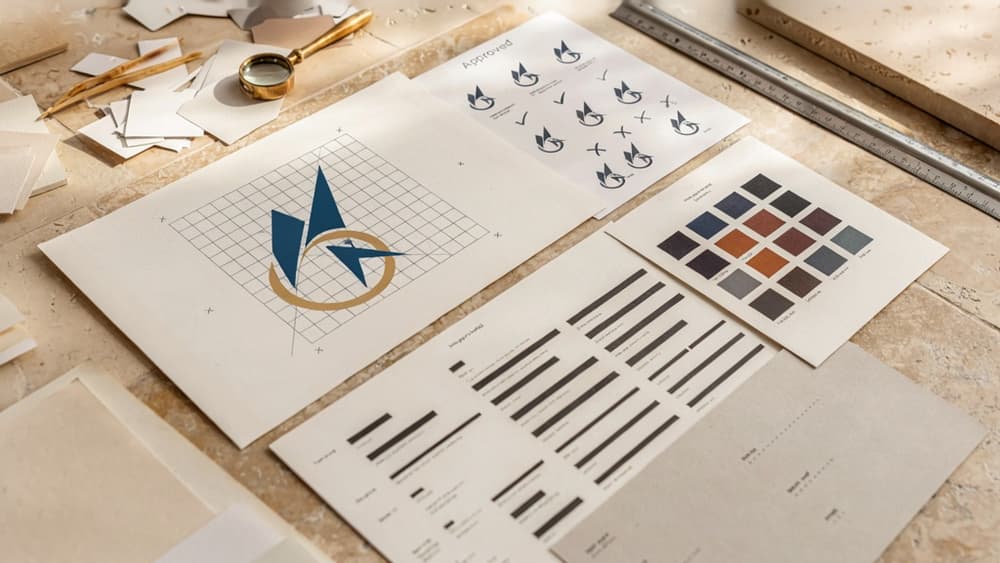
Visual Identity Examples: Logos, Colors, and Typography Rules
Once the structure is in place, the visual identity section should remove guesswork for every designer, freelancer, and account lead touching the client’s work. The goal is not to archive assets; it’s to make correct usage obvious.
Logo usage examples: clear space, sizing, and incorrect use
Strong logo rules show the right usage and the common mistakes your team will actually encounter in production.
Rule | Example to include | Why it matters |
|---|---|---|
Clear space | “Keep space around the logo equal to the height of the icon mark.” | Prevents crowded layouts in social posts, pitch decks, and web headers. |
Minimum size | “Digital minimum: 120px wide. Print minimum: 1 inch wide.” | Stops logos from becoming illegible in thumbnails, footers, and one-sheets. |
Approved versions | Full-color, one-color, reversed, icon-only | Gives teams options without letting them improvise. |
Background control | “Use reversed logo only on navy, charcoal, or approved photography overlays.” | Avoids low-contrast placements. |
Incorrect use | Don’t stretch, rotate, recolor, add shadows, place on busy images, or use old marks | Makes QA faster because reviewers can point to a rule, not personal taste. |
For agency teams, the most useful brand guidelines examples include “wrong” treatments beside approved versions. A junior designer should be able to look at a social graphic and immediately know whether the logo is too small, too close to the edge, or sitting on the wrong background.
Color palette examples: primary, secondary, and accessibility rules
Color guidance should go beyond a row of swatches. Specify when each color is used, where it should not appear, and which combinations are approved.
A practical color section might define:
- Primary palette: The core brand colors used for logos, hero sections, key campaign visuals, and major calls to action.
- Secondary palette: Supporting colors for charts, illustrations, backgrounds, icons, and modular layouts.
- Neutral palette: Text, borders, UI backgrounds, captions, and presentation templates.
- Functional colors: Success, warning, error, and information states for websites, apps, and landing pages.
Include values for HEX, RGB, CMYK, and Pantone where relevant, but also include usage notes. For example: “Use Electric Blue for primary CTAs only. Do not use it for body text or large background blocks.”
Accessibility rules are where many guidelines become operationally useful. Add approved pairings such as:
- Navy text on white
- White text on forest green
- Charcoal text on pale sand
- Electric blue buttons with white text only if contrast passes
Also list restricted pairings: “Do not place coral text on white” or “Do not use yellow as a button background with white text.” This prevents rework when assets move between web, social, email, and paid ads.
Typography examples: font hierarchy for digital and print
Typography rules should define hierarchy, not just font names. Your team needs to know how type behaves across deliverables.
For digital, include:
- H1: Font, weight, size range, line height, and use case
- H2/H3: Section and module headings
- Body: Default paragraph style for web and email
- Small text: Captions, labels, metadata, disclaimers
- Buttons: Case style, weight, and spacing
For print, specify equivalent styles for decks, brochures, sales sheets, and event materials. Print often needs different sizing, line lengths, and spacing than web, so don’t assume one hierarchy fits all.
A useful rule might read: “Headlines use Neue Haas Grotesk Display Bold, sentence case, tight tracking. Body copy uses Source Serif Regular, never below 9pt in print or 16px on web.”
Also include fallback fonts for non-design environments: Google Slides, PowerPoint, email builders, and client-edited documents. That single detail can save hours of cleanup when the client opens a deck and every slide reflows.
Brand Voice and Messaging Examples for Consistent Copy
Once the visual rules are clear, the next failure point is usually language: one freelancer writes polished enterprise copy, another writes punchy social captions, and the client starts sounding like three different companies.
Voice attributes that translate into copy decisions
Useful voice guidance does not stop at adjectives. “Friendly,” “expert,” or “bold” only helps if your team knows what to do with it.
For stronger brand guidelines examples, pair each voice attribute with writing behaviors:
Voice attribute | What it means in practice | Copy decision |
|---|---|---|
Confident | Leads with a clear point of view | Use direct claims, avoid “we believe,” “we aim to,” and hedging |
Helpful | Makes the next step obvious | Add plain-language explanations, examples, and action-oriented CTAs |
Premium | Feels considered, not loud | Use fewer exclamation points, avoid slang, keep sentences controlled |
Playful | Adds energy without losing clarity | Use light wordplay in headlines, keep body copy simple |
Technical | Builds trust with specificity | Include proof points, use precise terms, define jargon when needed |
A practical example for a B2B SaaS client:
- Too vague: “Our voice is smart, approachable, and innovative.”
- More usable: “We explain complex workflows in plain English. We sound like an experienced operator, not a hype-driven tech vendor. We use short sentences, specific outcomes, and calm confidence.”
That gives writers, strategists, and AI tools something they can actually apply.
Messaging examples: taglines, value props, and boilerplate
Messaging should give your team approved building blocks, not force every person to reinvent the client’s positioning from scratch.
For each client, define the core message at three levels:
Tagline example “Accounting software for founders who hate accounting.”
Best for: homepage hero, ad concepts, pitch decks, social bios.
Value proposition example “Finch helps early-stage founders send invoices, track cash flow, and prep for tax season without hiring a finance team.”
Best for: landing pages, email intros, sales enablement, product one-pagers.
Boilerplate example “Finch is accounting software built for early-stage founders and small teams. The platform combines invoicing, expense tracking, cash-flow visibility, and tax-ready reporting in one simple workspace, helping business owners stay financially organized without adding operational overhead.”
Best for: press releases, partner pages, proposals, speaker bios.
The key is to label where each message belongs. Otherwise, a punchy tagline gets stretched into a paragraph, or a dense boilerplate lands in a paid ad.
For agencies managing multiple clients, this prevents copy drift. Your team can move faster because the approved message is already there; they are adapting it to the channel, not recreating the strategy every time.
Do-and-don’t copy examples for writers and AI tools
Do-and-don’t examples are where voice guidelines become operational. They show the boundary between “on-brand” and “close, but not quite.”
For example, a premium interior design studio might define its copy rules like this:
Do:
- “A calmer way to create a home that feels considered, personal, and complete.”
- “We guide every decision, from spatial planning to final styling.”
- “Designed for clients who want a refined home without managing every detail.”
Don’t:
- “Transform your space with our amazing design magic!”
- “We make dream homes happen, one vibe at a time.”
- “Luxury interiors that will blow your mind.”
For a cybersecurity consultancy:
Do:
- “Identify your highest-risk vulnerabilities before attackers do.”
- “Clear remediation priorities for lean IT teams.”
- “Security guidance built for fast-moving companies.”
Don’t:
- “Military-grade protection for total peace of mind.”
- “We stop hackers in their tracks.”
- “The ultimate shield for your business.”
These examples are especially useful when agencies use AI across briefs, landing pages, email sequences, and social posts. Instead of prompting from scratch, your team can include the client’s approved do-and-don’t patterns so every draft starts closer to the right voice.

Imagery and Asset Usage Examples Across Client Channels
Once the core identity and voice are locked, imagery is where client work often starts to drift. One designer pulls from a polished brand shoot, another uses a moody stock image, a strategist drops mismatched icons into a deck — and suddenly the client looks like three different companies.
Strong imagery rules prevent that without slowing the team down.
Photography and illustration style examples
Useful image guidance goes beyond “use bright, authentic photos.” It should show what belongs, what doesn’t, and why.
For a B2B SaaS client, the photography section might specify:
- Preferred subjects: real teams collaborating, product-in-context shots, customer environments, founder or leadership portraits
- Composition: clean backgrounds, natural light, negative space for headlines, minimal visual clutter
- Mood: confident, practical, calm; avoid overly staged excitement or exaggerated “startup culture”
- People: diverse, work-relevant, not stock-photo performative
- Avoid: handshake clichés, glowing server rooms, abstract AI brains, generic laptop closeups
For an illustration-led brand, include direction like:
- Style: flat geometric shapes with subtle depth
- Line work: rounded corners, medium stroke weight
- Detail level: simple enough to work at small sizes
- Metaphors: systems, pathways, building blocks
- Avoid: overly playful mascots, 3D renders, complex scenes that compete with copy
The best brand guidelines examples include side-by-side “use this / not this” image choices. That gives junior designers, contractors, and content teams a fast visual filter instead of forcing every asset through a senior creative.
Social, web, and presentation asset examples
Different channels need different levels of control. A website hero image has to carry positioning. A LinkedIn carousel needs fast comprehension. A sales deck needs consistency across dozens of slides created by different people.
Spell out what “on-brand” means by channel:
Channel | Asset guidance to include | Agency risk it prevents |
|---|---|---|
Social posts | Approved image crops, background treatments, icon usage, thumbnail examples | Off-brand one-off graphics made under deadline pressure |
Website pages | Hero image style, section imagery, product screenshot treatment, image ratios | Pages feeling stitched together from unrelated campaigns |
Blog and resource assets | Cover image templates, chart style, pull-quote visuals | Content library looking inconsistent over time |
Email graphics | Header image rules, lightweight illustrations, CTA module visuals | Campaigns feeling disconnected from the main brand |
Sales decks | Slide cover examples, divider slides, data visualization style, image placement | Strategists and account leads rebuilding the brand in PowerPoint |
For agency teams, this is where guidelines become operational. Instead of asking, “Can someone make this look like the brand?” the team can start from approved patterns and adapt them quickly.
Usage rules for files, formats, and handoff
Asset rules should remove ambiguity at the moment of delivery. Include naming conventions, source file locations, export specs, and ownership notes so no one has to dig through Slack or old project folders.
A practical usage section might include:
- Master files: stored in a shared client folder with editable source files clearly labeled
- Exports: PNG for transparent graphics, JPG for photography, SVG for icons and simple illustrations, PDF for print-ready assets
- Naming convention: `Client_Channel_AssetType_Version_Date`
- Version control: final assets marked `FINAL`, working files kept separate
- Permissions: approved stock licenses, photographer credits, usage restrictions, expiration dates
- Handoff notes: where assets can be used, what can be edited, and what requires approval
This protects margin as much as brand quality. When every designer, freelancer, and account manager knows exactly which assets to use — and how to package them — the agency spends less time policing consistency and more time producing work the client trusts.
How to Make Brand Guidelines AI-Ready for Faster Agency Output
Once the brand system is documented, the next bottleneck is making sure every AI-assisted draft uses it without a strategist rewriting the prompt from scratch each time.
Turn guidelines into reusable AI instructions
Don’t paste a 40-page PDF into a chat and hope the model finds the right rules. Convert the guidelines into a reusable instruction layer your team can apply to every brief.
For each client, create a compact “AI brand profile” with:
- Brand role: what the client does, who they serve, and what outcome they help create.
- Audience context: buyer type, maturity level, pain points, objections, and decision criteria.
- Positioning guardrails: what the brand should be known for, plus claims or categories to avoid.
- Voice rules: the practical writing behaviors the AI should follow.
- Messaging hierarchy: primary value proposition, supporting proof points, approved boilerplate, and priority offers.
- Channel instructions: how output should shift for ads, email, landing pages, sales decks, blogs, or social.
- Hard constraints: banned phrases, legal claims to avoid, terminology preferences, competitor references, and formatting requirements.
A simple reusable instruction might look like:
Create this output for [client] using the approved brand profile. Prioritize [audience], [offer], and [channel]. Match the client’s voice rules. Use only approved positioning and proof points. Avoid banned claims and phrases. Return the draft in [format] with [number] options.
That instruction becomes more valuable when it lives somewhere shared, not buried in one account manager’s chat history. This is where agencies lose time with AI tool sprawl: every person builds their own version of the client’s brand. Aethera solves that by ingesting the client brand once, then applying it across outputs so drafts start closer to approved.
QA checklist for on-brand AI-assisted work
Before AI-assisted work goes to a client or internal approver, check it against the brand profile—not just the original prompt.
Use a short QA pass:
- Brand fit: Does this sound like the client, or like a generic category expert?
- Audience fit: Is it written for the correct buyer, awareness stage, and level of sophistication?
- Message fit: Does it lead with the approved value proposition and support it with the right proof?
- Channel fit: Is the structure appropriate for where this will appear?
- Constraint fit: Does it avoid banned claims, off-brand phrasing, and unsupported promises?
- Usefulness: Would this reduce editing time, or does it still require a senior person to reshape the strategy?
The goal is not to make AI output perfect. It’s to make the first draft operationally useful: close enough that your team edits for sharpness, not basic brand alignment.
Update rules when the client brand evolves
AI-ready guidelines need version control. If the client updates positioning, launches a new offer, changes audience focus, or retires a phrase, your AI instructions should change the same day.
Set a simple rule: every approved brand change triggers three updates:
- Update the source guideline.
- Update the AI brand profile.
- Archive or label old instructions so the team doesn’t reuse them.
For agencies managing multiple clients, this prevents the quiet drift that happens when one strategist has the new messaging, another freelancer has the old deck, and an AI tool is still using last quarter’s prompt.
The strongest brand guidelines examples are not static documents. They become the operating layer behind repeatable, on-brand production—especially when AI is part of the workflow.